

What Model is My Phone?

Not sure what model your phone is? If you’re thinking of selling your phone, you’ll need some information about the make and model of your device to make sure you’re getting an accurate price.
It sounds simple, but it can get a little confusing, especially if you’re wondering “can you tell your phone model without turning it on?”
If you’ve found yourself wondering how much is my phone worth, the first thing to do is find out exactly what model your device is.
Even if you no longer have the original packaging, there are plenty of other ways to check.
Find the Model of Your iPhone Through Settings
If you have a working iPhone that is fully functional, you can find out the model of your device by opening your Settings and navigating to General > About.
From here, you’ll be able to see your iPhone Model Name, Model Number, and Capacity.
It’s important to know the storage capacity when you trade in phones for cash, as it will affect the price.
For example, a phone with 256GB of storage will usually be worth more than an identical model with only 64GB of storage.
Some older iPhones won’t display the Model Name in the Settings menu and may only show the Model Number. You can use this number to identify the exact model.
From the Model Number, you can determine useful information about the device, including details relating to its model and specification.
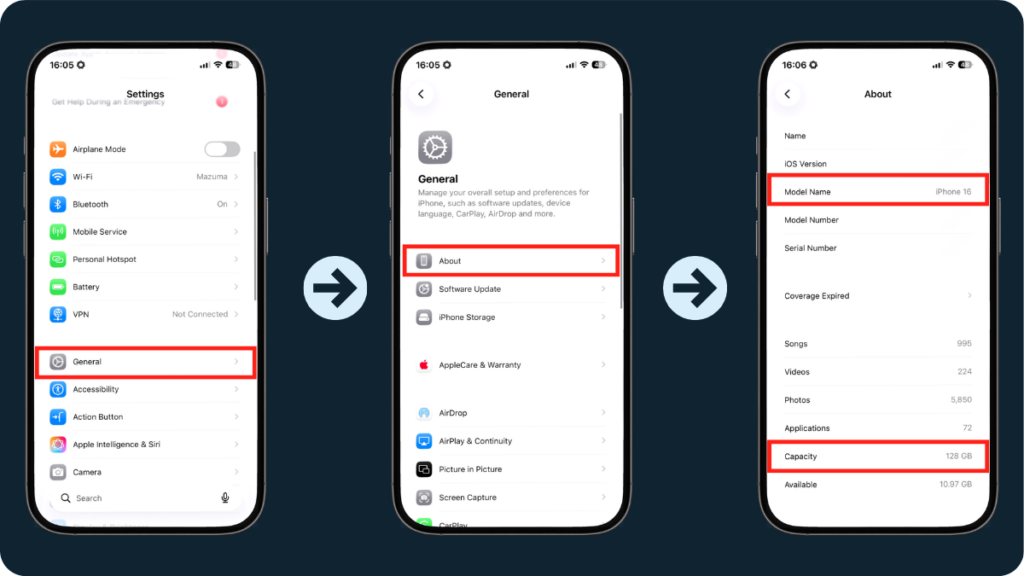
- Go to Settings.
- Tap General.
- Tap About.
- View Model Name.
- View Capacity.
Find the Model of a Broken iPhone
If your device is broken or unresponsive, you might still be wondering, can I
sell my iPhone?
In many cases, the answer is yes, but you’ll still need to know the model before you can get a quote.
Accessing the Settings menu on an unresponsive phone isn’t possible, but there are still other ways to identify your iPhone.
Where to check
Older iPhones may have a small identification number beginning with A printed on the device.
Depending on the iPhone generation, identifying information may also be found around the SIM tray, on the original packaging or within your purchase information.

Find the Model of an Android Phone Using Settings
Finding the exact model of an Android phone can vary slightly depending on the manufacturer, as Android is the operating system rather than the handset itself.
However, if you’ve got a fully functioning Android device and you’re interested in a Samsung trade in, for example, you should be able to find the model information through the Settings menu.
Go to Settings > About phone or Settings > About device.
On this screen, you should see basic information about your phone, including the model name, model number or both.
The exact wording and location can vary slightly between manufacturers, but the information is usually easy to find within the About Phone section.
- Open Settings.
- Tap About phone or About device.
- Look for the Model name or Model number.
Find the Model of a Broken Android Phone
Identifying an Android phone that won’t turn on can be a little less straightforward, simply because there are so many different devices made by different manufacturers.
If you can’t access the Settings menu, try looking in the following places:
Check the back or bottom of the phone, particularly on older models.
Look around the SIM tray or SIM slot for identifying information.
The box will often show the exact model and storage capacity.
Check your receipt, order confirmation or network account.
Some older Android devices may also have identifying information underneath a removable battery, although this is much less common on modern smartphones.
If you can find the phone’s model number, IMEI or serial number, you may also be able to use this information to identify the exact device through the manufacturer’s website or customer support.
If all else fails, it may be possible to identify the phone by sight. If you know the manufacturer, compare the device with images of its different models online.
We’d recommend trying the methods above first or taking the phone to a specialist who may be able to identify it for you.
We promise to pay exactly what we quote, providing the device matches the condition you selected when placing your order.
If we disagree with the condition and you don’t accept our revised offer, we’ll return your device to you for free.
If you’re a business looking to sell devices conveniently and securely, check out our
business phone recycling service today.
Frequently Asked Questions
How do I find out what phone I have?
You can usually identify your phone model through the Settings app. On an iPhone, go to Settings > General > About.
On most Android devices, go to Settings > About phone or About device to find the model name or model number.
Can I check my phone model without turning it on?
Yes. Check the original packaging, purchase receipt or order confirmation first.
You may also find identifying information on the back of the device or around the SIM tray, depending on the phone model.
If you can find the IMEI, serial number or model number, the manufacturer or your mobile network may also be able to help you identify the exact device.
Where is the model number on an iPhone?
The easiest way to find your iPhone model is by going to Settings > General > About.
If the iPhone won’t turn on, check the original packaging or your purchase information.
Physical markings vary between different iPhone generations, so the model number won’t necessarily be printed on the back or SIM tray on newer devices.